


Intercambio de controles rompe su flujo
Compartir teclado, ratón y desplazamiento
Organice pantallas para que coincidan con su escritorio y cambien en un borde compartido. La entrega de entrada no fluye la otra pantalla.
 ArcRelay Mouse
ArcRelay Mouse
Hecho para · Trabajadores de ordenadores múltiples, desarrolladores y configuraciones de escritorio
Muévete entre computadoras sin cambiar teclados, o usa un trackpad para una tarea de entrada rápida lejos de tu escritorio.
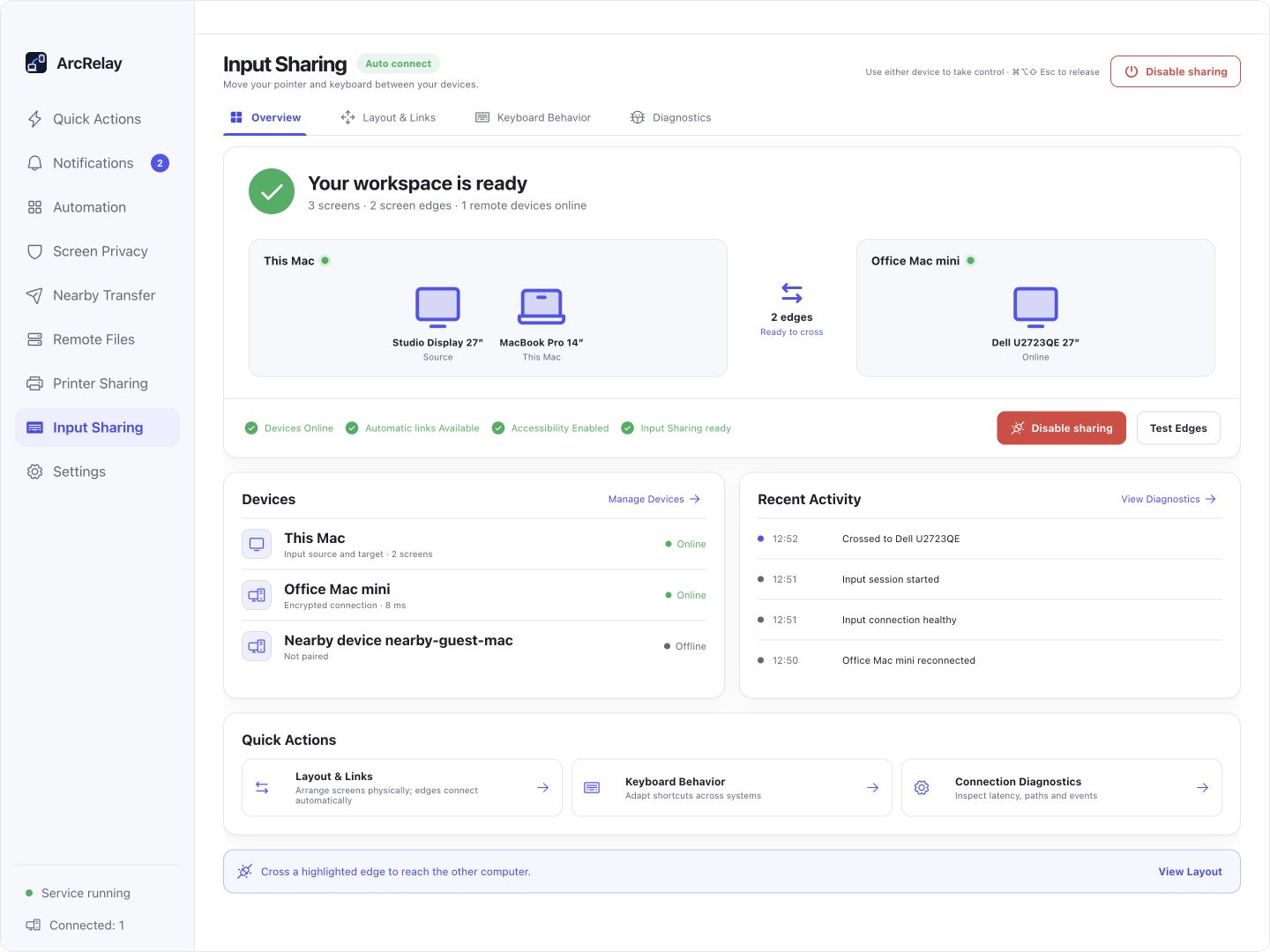
Vista general de la Suite Input Sharing: mostrar las posiciones, el estado de la conexión y la actividad de entrada reciente.
Capturado desde una vista previa del desarrollo en inglés de la interfaz de escritorio actual con dispositivos de ejemplo y contenido. La versión instalada determina la interfaz y las características disponibles.
PENSADO PARA TU DÍA A DÍA
Mantenga las manos en los mismos controles que los movimientos de trabajo entre computadoras. Organizar las pantallas, luego cruzar un borde vecino para continuar.
Intercambio de controles rompe su flujo
Organice pantallas para que coincidan con su escritorio y cambien en un borde compartido. La entrega de entrada no fluye la otra pantalla.
El mismo atajo se comporta de manera diferente entre los sistemas
Traducir atajos de edición para el sistema objetivo, o preservar el comportamiento de clave física para el trabajo terminal.
Necesitas un camino de vuelta claro cuando una conexión cae
Desconectar o desactivar las versiones compartidas de entrada. Command/Ctrl + Alt + Shift + M libera el control y centra el puntero local.
EMPIEZA CON UNA TAREA
Organizar pantallas en la entrada de pantalla cruzada; el tamaño, escala y rotación afectan a las regiones de entrega.
Verificar la identidad, conceder acceso a la entrada y completar los permisos de entrada del sistema del ordenador objetivo.
Cruzar un borde vecino para cambiar de computadoras. Command/Ctrl + Alt + Shift + M libera el control y centra el puntero local.
ANTES DE EMPEZAR
macOS necesita acceso Accesibilidad; la entrada remota del teléfono no admite Linux todavía. El intercambio de entradas no transmite un escritorio remoto.
Esta página describe el valor del producto enfocado; no anuncia una versión independiente del paquete.
Lea los detalles de la función y el permisoArcRelay Suite reúne tareas de entrada, contenido y locales sobre conexiones de dispositivos confiables.