

Sniptra
Capturarlo. Fíjalo. Sigue avanzando.
Sniptra convierte la captura de regiones y ventanas, anotaciones editables, reconocimiento de texto local e imágenes pinneadas en una acción continua. Está integrado en ArcRelay y también está disponible como paquetes independientes para Windows, macOS y Linux.
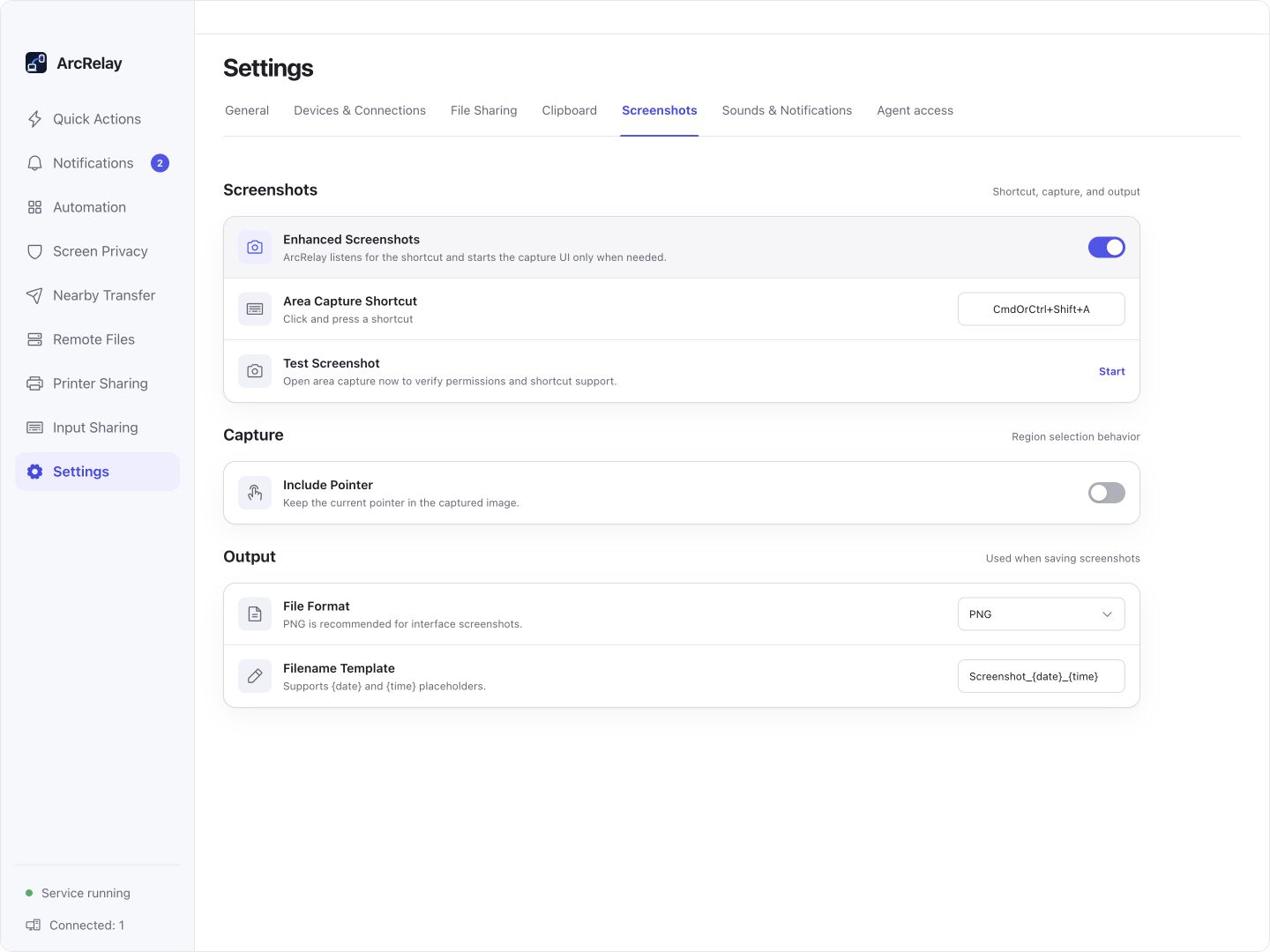
Ajustes de integración Sniptra en Suite: atajo, puntero y formato de salida. Este no es el editor de anotaciones.
Capturado desde una vista previa del desarrollo en inglés de la interfaz de escritorio actual con dispositivos de ejemplo y contenido. La versión instalada determina la interfaz y las características disponibles.
UN SNIPTRA, DOS FORMAS DE USARLO
Incluido en ArcRelay. Diseñado para estar solo.
Tomar una captura de pantalla es un trabajo completo en sí mismo. Utilice el Sniptra incorporado cuando necesite la colaboración ArcRelay, o el producto independiente cuando una herramienta de captura de pantalla es todo lo que necesita.
Dentro de ArcRelay
Las integraciones de escritorio para Windows y macOS 12.3+ incluyen el componente sin otra instalación. Integrado no significa activado: activa las capturas mejoradas en los ajustes generales. El historial del portapapeles y la sincronización a otros dispositivos siguen los ajustes y permisos de ArcRelay.
- Completado con paquetes de escritorio ArcRelay compatibles
- Opt in, a continuación, lanzar a la demanda
- Configuración aislada de la aplicación independiente
Sólo Sniptra
La aplicación independiente Sniptra tiene su propia bandeja del sistema, atajos y ajustes. Hay paquetes para Windows x64, macOS en Apple Silicon y Linux x86-64.
- No se requiere ArcRelay o emparejamiento del dispositivo
- Bandeja independiente, atajos y ajustes
- Captura, anotación y OCR se ejecutan localmente
El componente combinado de ArcRelay y la aplicación independiente Sniptra mantienen la configuración separada. El repositorio independiente GitHub distribuye documentación y binarios; su código fuente no es código abierto.
v0.1.0 · Construir 21 · Liberado 2026-09-07
Elija el paquete para su dispositivo.
La aplicación Sniptra independiente está disponible para Windows, macOS y Linux. Verifique una descarga contra la lista SHA-256 en la página de lanzamiento cuando sea necesario.
Windows
x64 MSI también disponible · 14.7 MB
macOS
Requiere macOS 12.3 o posterior
Linux
amd64 DEB también disponible · 17.4 MB
La versión independiente admite actualmente Windows x64, macOS en Apple Silicon y Linux x86-64. Su repositorio GitHub distribuye documentación y binarios; el código fuente de Sniptra no es de código abierto.
Para quién es
Ve si encaja con lo que necesitas hoy.
- Captura y anotación rápidas de retroalimentación, documentación y conversaciones
- Extracción de texto local o pinning de imágenes para referencia
- Utilizar capturas de pantalla dentro de ArcRelay o instalar Sniptra por sí solo
- Grabación de pantalla, edición de vídeo o una librería compartida de capturas de pantalla en la nube
- Soporte de desplazamiento-captura idéntico en todas las plataformas
- Un requisito para el código fuente Sniptra de código abierto
PENSADO PARA TU DÍA A DÍA
Haga su punto después de la captura.
Marque el área importante, añada una nota o extraiga texto, luego copie, guarde o pin el resultado en un flujo de trabajo de captura.
Una pequeña anotación necesita otro editor
Captura y anotación editable
Captura una región o ventana y añade flechas, formas o texto. Ajuste las anotaciones sin tomar la captura de pantalla de nuevo.
El texto en una imagen tiene que ser digitado de nuevo
Ejecute OCR localmente a petición
Reconoce el texto que necesitas en el lienzo de captura y copialo en tu próxima tarea. OCR se ejecuta en el dispositivo.
Tu imagen de referencia es enterrada.
Pin, copia o guarda
Pin una imagen para referencia, copiarla o exportarla. La captura por desvío varía según la plataforma; no hay biblioteca de screenshot-history.
Una manera sencilla de empezar
Captura. Explícalo. Entrega.
Captura
Comience desde las acciones de captura de pantalla de ArcRelay, o SniptraÓs propia bandeja y atajos.
Explicar
Destaca lo que importa, agrega texto o extrae contenido con OCR local.
Entrega
Copia, guarda o pin el resultado como referencia de escritorio.
Limitaciones y confianza
Vea cómo funciona, y dónde están sus límites.
No hay llamadas automáticas de red
Sniptra por sí mismo no necesita ninguna cuenta y no hace solicitudes automáticas de nube o telemetría.
OCR permanece en su dispositivo
El reconocimiento de texto se ejecuta a la demanda usando modelos locales enviados con la aplicación.
No hay historial de capturas de pantalla
Sniptra no registra ningún historial de capturas de pantalla. El contenido copiado es administrado por el portapapeles del sistema y las aplicaciones relacionadas.
Compartir sigue el permiso
Dentro de ArcRelay, sincronización de portapapeles y entrega de archivos siguen los ajustes de ArcRelay, relaciones de emparejamiento y permisos.