
ArcRelay Clipboard

Pick up what you copied, wherever you continue.

Made for · Writers and knowledge workers handling text, images and reusable snippets

Find text you copied earlier or information in an image, then relay the content to another trusted device.

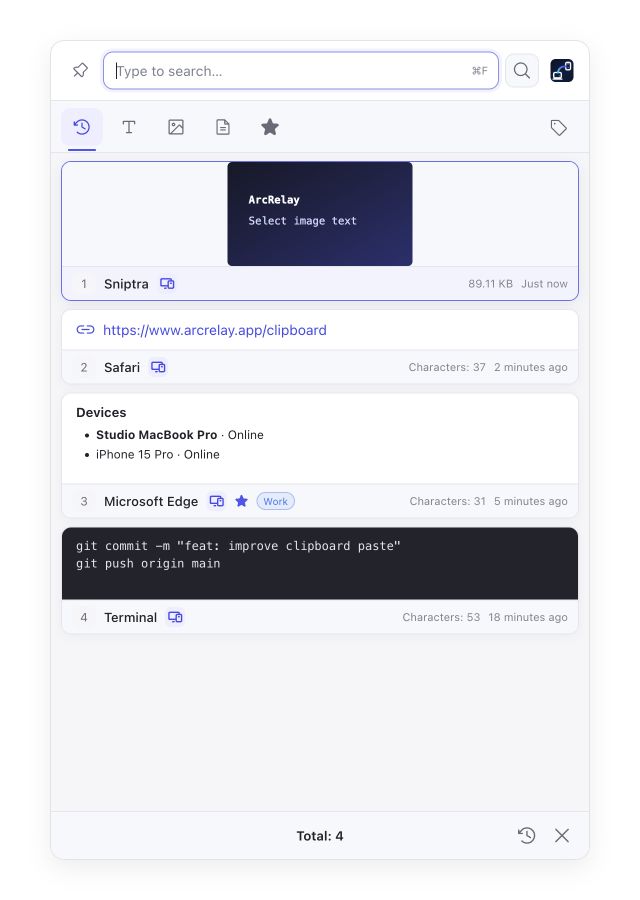
Suite Clipboard: text, images, favorites and source devices, with English sample content.
Find what you need in history

Suite Clipboard: text, images, favorites and source devices, with English sample content.

Captured from an English development preview of the current desktop frontend with example devices and content. The installed version determines the interface and available features.

BUILT AROUND YOUR DAY

Make what you copied useful again.

Find and reuse text, images and snippets, then decide what should continue onto your other devices.

01

The next copy replaces the snippet you needed

Search and filter history

Filter history by content type and favorite useful snippets. Locally recognized text in images can also be searched.

02

You keep messaging yourself between devices

Relay content with explicit grants

Sync and remote paste follow their own settings and grants. Pasting into another computer’s current focus also requires input access.

03

History grows without clear retention

Control retention and sync

Review count, size, age and sensitive-content policies. Disable sync for local-only use. File-path records are not file backups.

Explore features, permissions and platform support

START WITH ONE TASK

Put the steps together.

01

Choose history retention and sync settings

Review count, size, age and sensitive-content retention; disable sync for local-only use.

02

Search, filter or favorite useful content

Open Clipboard and filter by text or image; locally recognized image text is searchable too.

03

Copy it, or paste on an authorized computer

Copy a history entry again. Pasting into another computer’s current focus also requires clipboard read/write and remote-input grants.

Read the user guide

BEFORE YOU START

Know what to expect.

Sync settings are currently on by default but require pairing and grants. File paths are not backups; masking a sensitive preview does not mean the original was never stored.

This page describes the focused product’s value; it does not announce a standalone package release.

Read the feature and permission details

Need several tools working together?

ArcRelay Suite brings input, content and local tasks together over trusted device connections.

Explore Suite